See how it looks
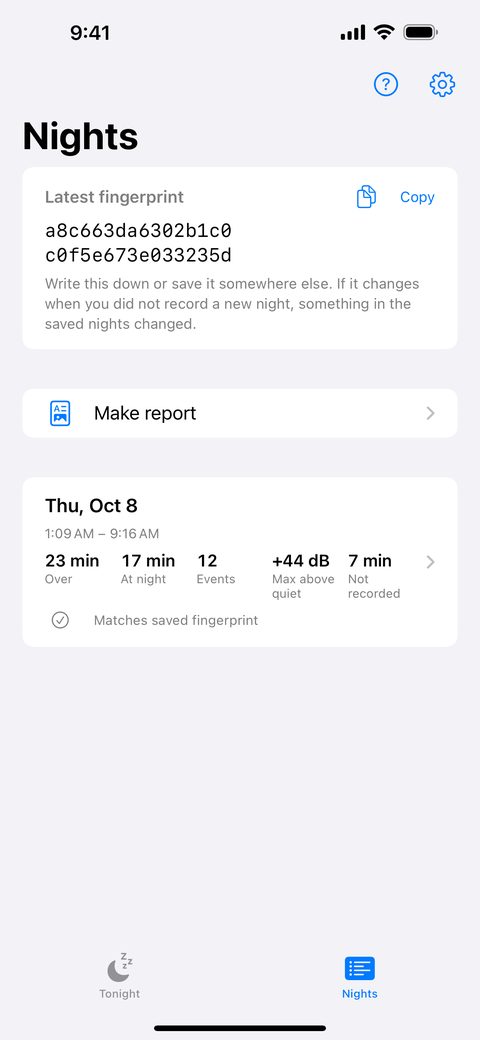
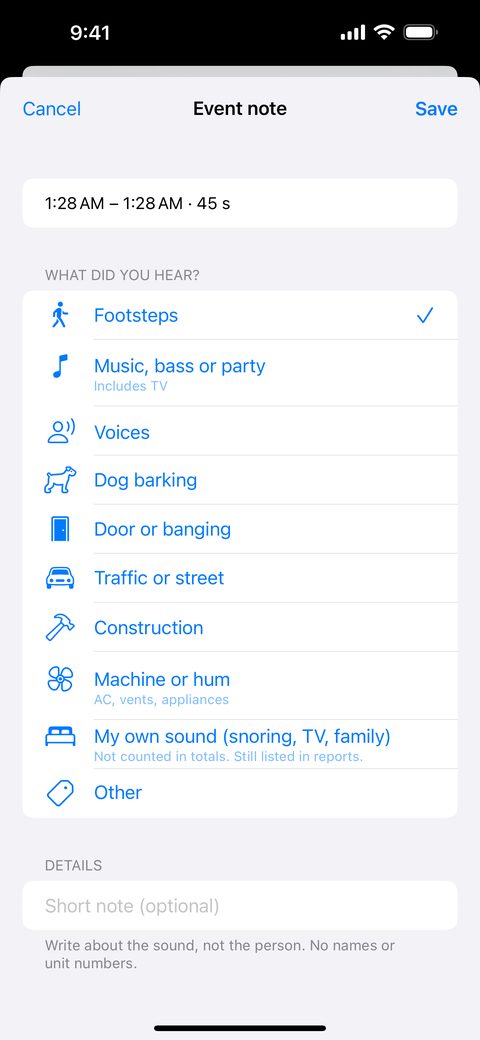
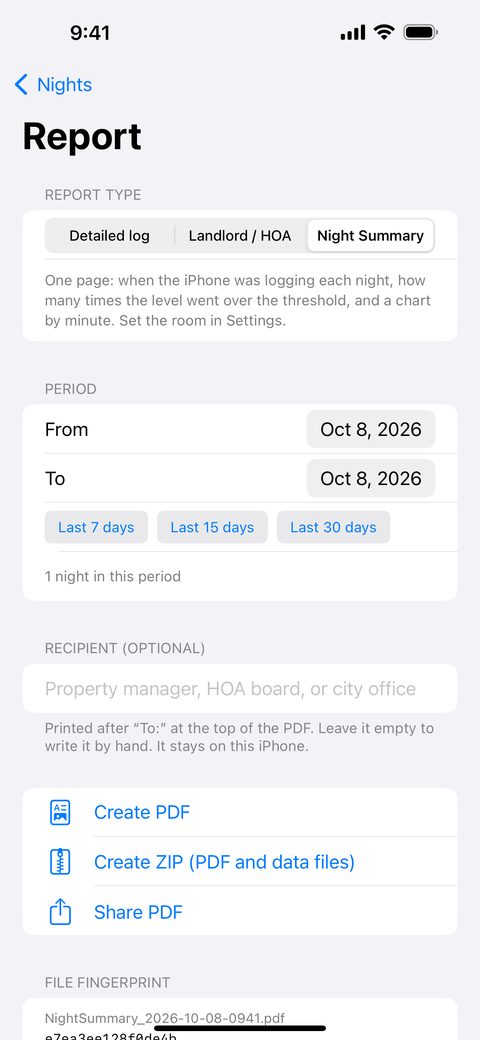
Screens show sample data.
Open this page on your iPhone
Scan the code with your iPhone camera to open this page, or share the link: fututukamono.github.io/thin-walls.
Get the app: coming soon to the App Store. The App Store address will be apps.apple.com/us/app/id6820058269. The page opens when the app is released.
Built from what people asked for
People who live with noise in apartments, condos and houses across the US keep asking for the same things. We read what they wrote in app reviews and renter forums before building Thin Walls, and we built it to answer them.
- "I can't tell what it is measuring." Thin Walls shows when it got loud, for how long and how often. Levels are shown as dB above that night's quiet level, and the app says plainly that they are estimates.
- "I don't want my home recorded or uploaded." No audio is saved. There is no account, and nothing is sent to us.
- "Let me delete data and fix mistakes." Delete all nights in Settings removes everything. You can mark your own snoring or TV so it is not counted.
- "Managers say recordings can be edited." Thin Walls shows a file fingerprint, so you can see whether an exported file is still the same file.
- "No surprise charges." Logging is free. Your first full report is free. Unlimited reports are a one-time purchase, with no subscription.
Based on our reading of public reviews and forum posts. They are not statements by named people.
Your privacy and safety
- No audio is saved. The app keeps the sound in memory for under a second to work out a level, then discards it.
- No account, and nothing is sent to us. Your levels, times, notes and reports stay on your iPhone until you share them.
- You choose what to share. A report is a file you make and send yourself.
- You can delete everything. In Settings, Delete all nights removes every saved night from the iPhone.
- Other people's privacy. Write about the sound, not the person. Do not write names or unit numbers.
- Safe use. Keep the iPhone charging with its normal charger, off pillows and blankets.
- Adults only. Thin Walls is for people 18 and older.
Read the Privacy Policy and the privacy questions and answers.
What this app is not
Please read this before you decide to use Thin Walls or rely on what it shows.
- It is not a certified sound level meter. It estimates sound levels from the iPhone microphone. The microphone, its case, where you put the iPhone and other sounds in the room all change the result. A very loud sound can read lower than it was.
- Nobody has promised to accept what it makes. No city office, 311 service, police department, landlord, property manager, HOA or court has promised to accept a report from this app, and a report may not be accepted as evidence. Rules differ by place and by person, and some do not accept phone readings at all.
- It is not legal advice. We are not a law firm. The app does not decide whether a noise rule, a lease or a law was broken, and using it does not create a lawyer-client relationship.
- It is not connected to anyone. Thin Walls is not affiliated with, and not approved by, any city office, police department, landlord, HOA or Apple. It does not send complaints or reports for you.
- It does not know what made a sound. It does not know who made a sound or where it came from. Notes are typed by you.
- It does not promise results. There is no promise that it will record every night, run without interruption, or help in any dispute.
- It is not for emergencies. If you are in danger, call 911 (or your local emergency number). It is also not a hearing-protection or medical device.
What Thin Walls does
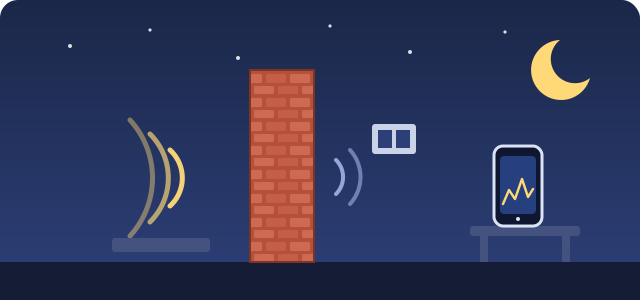
Thin Walls keeps a night-by-night log of noise from a neighbor or a barking dog: when it got loud, for how long, and how often. Each item below comes with the limit that goes with it.
Logs the night, even with the screen locked
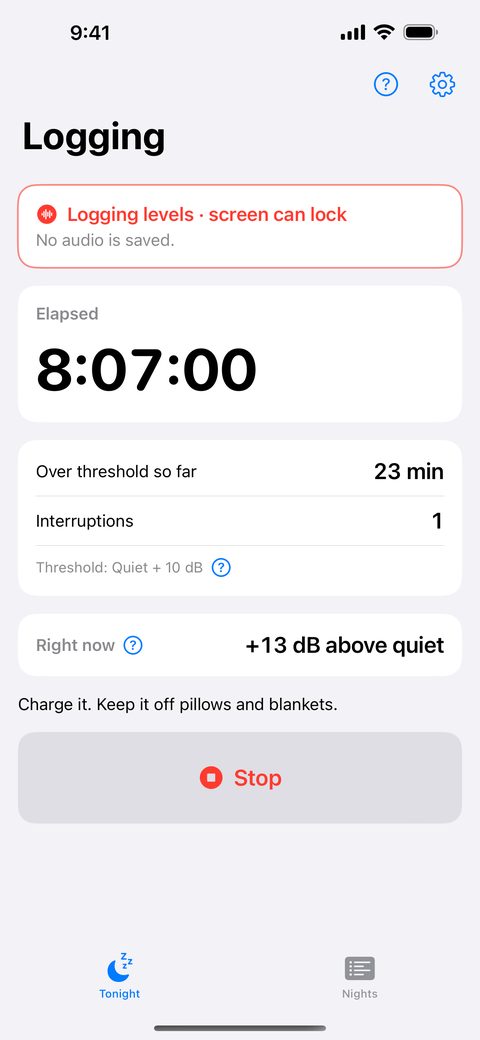
Tap Start before bed. The app estimates the sound level every second and keeps going while the screen is locked.
Caution: Logging can stop, for example after a phone call, when another app takes the microphone, or when the battery runs out. Time that was not recorded is shown as not recorded. It is never filled in. Keep the iPhone plugged in.
Reminds you where to put the iPhone
Before you start, the app reminds you to place the iPhone a few feet from the wall, ceiling or window the noise comes through, and not at your bedside.
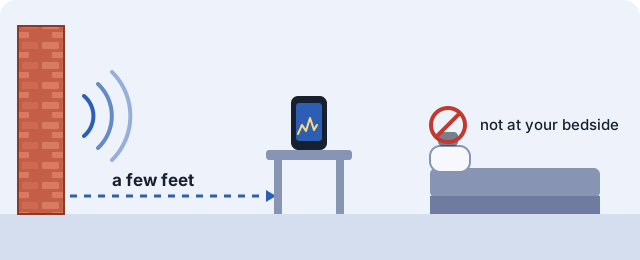
Caution: Where you put the iPhone changes the result. Put it only where you are allowed to leave a device.
Lists your nights
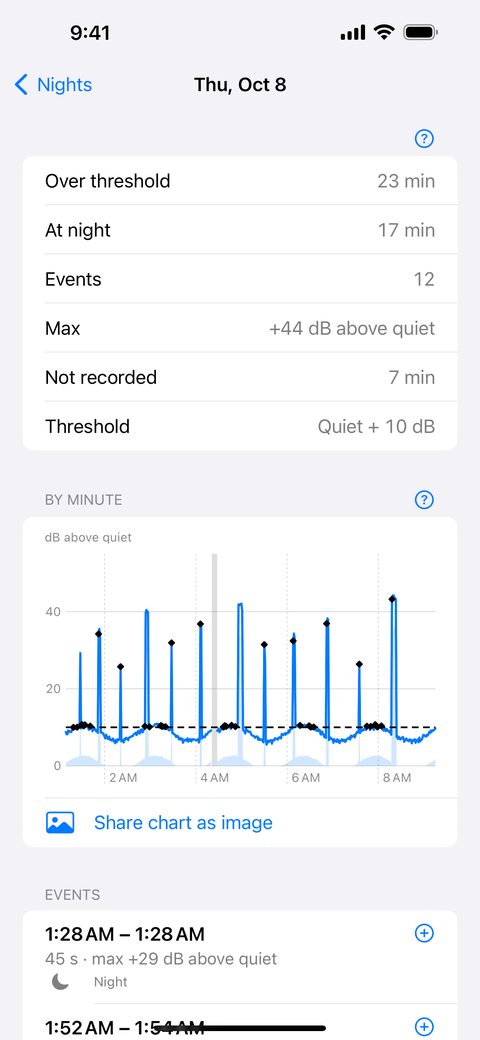
See each night: minutes over your threshold, minutes at night, how many events, the loudest moment, and any time the app was not logging. Open a night for a chart by minute.
Caution: The threshold sets itself 10 dB above the quiet level in the first 10 minutes of the night. "Events" and "time over the threshold" are calculations the app makes from its own estimated numbers. They are not findings about any person, any source of a sound or any rule.
Lets you add notes
Tap an event to note what you heard: footsteps, music, bass or party, voices, dog barking, door or banging, traffic or street, construction, machine or hum, or other. You can also mark an event as your own sound (snoring, TV, family). It stays in the log but is not counted in the totals.
Caution: Note types are labels that you choose. The app does not decide what made a sound. Write about the sound, not the person. Do not write names or unit numbers.
Optional calibration
If you own a sound level meter, you can match the app's level to your meter at one test level.
Caution: This does not make the app a certified meter. Calibration does not correct the microphone's frequency response, or the estimates at other levels or for other kinds of sound. We cannot check your meter or what you enter. Calibrated levels are still estimates.
Share a PDF, ZIP or chart image
Make a PDF in one of three kinds, and share it with the iOS share sheet:
- Detailed log: dates, times and lengths of louder periods, with a page on how the levels were estimated.
- Landlord / HOA: dates, times and lengths of louder periods, as an attachment for a landlord or HOA.
- Night Summary: one page with when the iPhone was logging each night (up to six nights), how many times the level went over your threshold, and a chart by minute.
You can type a recipient on the report screen, for example a property manager, an HOA board or a city office. It is optional. It is printed after "To:" at the top of the PDF, and you can leave it empty to write it by hand.
You can also export a ZIP (the PDF, the per-second values as CSV, the times the app was not logging, and a README), a chart of one night as an image, and the data files of any night.
Caution about reports: A report is made by you, on your own iPhone. No police department, 311 service, city office, court, landlord, property manager or HOA made, checked or approved it, and none has promised to accept it. It may not be accepted as evidence. It does not say what made a sound, who made it, or whether any law, lease or rule was broken. Page 1 of every PDF carries a box with these limits.
File fingerprint
After you create a PDF or ZIP, the app shows a SHA-256 file fingerprint. If a file you compare shows the same value, it is byte-for-byte the same as the file you exported.
Caution: The fingerprint shows only that. It does not show who made the file, that the sounds happened as described, or that nothing was changed before export.
Free, and a one-time purchase
| What you get | Free | One-time purchase ($9.99) |
|---|---|---|
| Overnight logging | Yes | Yes |
| On-screen nightly summaries and charts | Yes | Yes |
| Notes on events | Yes | Yes |
| Raw data (CSV) export | Yes | Yes |
| Full report (PDF and ZIP) | Your first one, free | Unlimited |
That is the only difference: the free version includes everything except unlimited reports. You pay once. There is no subscription.
Always free
Overnight logging, on-screen nightly summaries and charts, notes, chart images, data export.
Free to try
Your first full PDF and ZIP, once, at no cost.
One-time purchase
Unlimited PDFs and ZIPs for $9.99, once. No subscription. The App Store shows the final price in your currency before you buy. Restore Purchases is on the purchase screen and in Settings.
Caution: "One-time" means you pay once for this unlock. It is not a promise that the app, or Apple's services, will be available forever. We may update, change or stop the app. If a future version removes the unlocked feature, we will say so in the app before the change and tell you how to ask Apple for a refund. Purchases are paid through your Apple Account and handled by Apple under Apple's rules.
Privacy
No audio is saved. The app saves sound levels, times and your notes in the app on your iPhone. There is no account. We never receive your levels, times, notes or reports.
What this does and does not mean: The microphone can pick up voices and other sounds in the room while the app is logging. The app keeps the sound in memory for under a second to calculate a level, turns it into level numbers, and then discards it. It does not recognize speech. Files you share go where you send them. Your records may be included in your own iPhone backups. If you chose to share analytics with app developers in your iPhone settings, Apple may give us aggregated crash data and usage statistics that do not personally identify you.
Read the Privacy Policy: what the app keeps and what we receive.
You are responsible for how you use it
- Follow the laws where you live. Laws on recording and listening to other people's conversations, and on other people's privacy, differ by state and country, and some require everyone's consent. We cannot tell you whether using the app is lawful where you are. You alone are responsible for following the laws that apply to you.
- Place the iPhone only where you are allowed to. Do not put it where you do not have the right to be or to leave a device, such as in someone else's home or in a shared area without permission. Do not use the app to listen in on or watch another person.
- Write about sounds, not people. A false or unfair statement about a person can make you responsible for the harm.
- Do not use it to harass or pressure anyone. Share a report only with the people handling your matter, and do not post it online.
- Use it safely. Keep the iPhone plugged in with its normal charger, off pillows and blankets.
- Age. Thin Walls is for adults only. To accept the Terms of Use, you must be at least 18 years old and have reached the age of majority where you live. The app is not directed to children under 13. In places where the law requires apps to check age, the app first asks iOS for your age range. The answer stays on your iPhone, and if it shows you are under 18, you cannot accept the Terms of Use or use the app.
No warranty, and limits on our responsibility
- Provided "as is." To the maximum extent the law allows, the app and everything it makes are provided "as is" and "as available," without warranty of any kind.
- We are not responsible for outcomes. To the maximum extent the law allows, we are not liable for lost data, for the outcome of any complaint, dispute, lease, HOA proceeding or court case, or for any claim by a third party (including a neighbor) about what you log, write or share. Our total liability to you is limited to the greater of what you paid us for the app in the 12 months before the claim and US$50.
- Rights the law protects stay with you. Nothing here limits any right or remedy that the law does not allow to be waived or limited.
The exact wording is in sections 7 and 8 of the Terms of Use, which you accept in the app before you start.
When people use Thin Walls
- Footsteps or music from the unit above or next door. Where to put the iPhone and how to note what you heard.
- A dog that barks at night. Note it as dog barking.
- Your own snoring or the TV in the log. Mark it as your own sound.
- A call or Siri during the night. What happens when logging stops.
- Sending a report to a property manager, an HOA board or a city office. Make a report.
- A new iPhone, or deleting everything. Restore Purchases and Delete all nights.
Questions people ask
- Will my landlord, HOA or city accept a report from this app?
- We cannot promise that. None of them has promised to accept it, and rules differ by place and by person. If your situation is serious, consider asking a lawyer or a local tenants' organization. This page is not legal advice.
- Can I rely on the numbers?
- Treat them as rough estimates from a phone microphone. The app is not a certified sound level meter, and a very loud sound can read lower than it was.
- Does the app record my neighbors?
- The app does not save audio. The microphone can still pick up sounds in the room while it logs, and the app turns them into level numbers. Whether using it is lawful where you are depends on the laws that apply to you.
- Do you get my data?
- We never receive your levels, times, notes or reports. They stay in the app on your iPhone until you share them.
More answers are on the questions and answers page and the Help page.
In short: estimates from an iPhone microphone. Not a certified sound level meter. Not legal advice. No promise that anyone will accept a report. Your use is your responsibility. Read the Terms of Use: what the app can't do and what you're responsible for.