Thin Walls / Help
Help: how to use Thin Walls
Thin Walls is an iPhone app that keeps a night-by-night log of estimated noise levels. These pages follow the Help screen inside the app. Looking for a quick answer? See the questions and answers.
Read this first. Thin Walls is a personal noise log, not a certified sound level meter. Its levels are estimates and can be wrong. Nobody has promised to accept what it makes. See What this app is not.
Where to put the iPhone
Place the iPhone a few feet from the wall, ceiling or window the noise comes through. Not at your bedside.
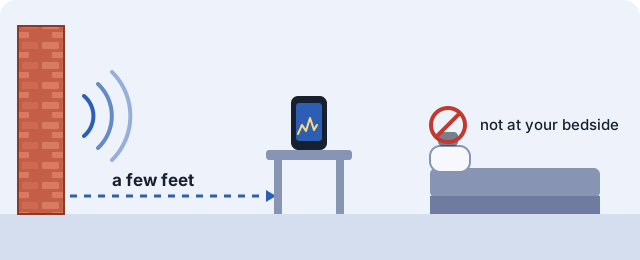
Where you put the iPhone changes the result. Put it only where you are allowed to leave a device. Keep it charging, and do not put it under a pillow or blanket.
Log a night
Tap Start before you go to sleep. The app estimates the sound level every second and keeps going while the screen is locked.
Keep the iPhone charging. Do not put it under a pillow or blanket.
In the morning, open the app and tap Stop, then Save.
If logging stops
If logging stops, for example after a call, you get an alert. Allow notifications to see it. The app also tries to start measuring again. Do not count on it: time that was not recorded is shown as not recorded, and the app never fills it in.
If the app says microphone access is off, turn on microphone access for this app in your iPhone Settings.
Read your nights
The Nights tab shows each night: minutes over the threshold, minutes at night, events, the loudest moment, and any time the app was not logging.
Open a night to see a chart by minute. You can share the chart as an image.
Export gives you the per-second values (CSV), a short log of when logging started, stopped or was interrupted (CSV), the night summary (JSON) and fingerprint.txt.
Add a note to an event
Tap an event to add a note about what you heard: footsteps, music, bass or party (includes TV), voices, dog barking, door or banging, traffic or street, construction, machine or hum, my own sound (snoring, TV, family), or other. You can add a short note too. Write about the sound, not the person. Do not write names or unit numbers.
Note types are labels that you choose. The app does not decide what made a sound.
My own sound
Snoring, the TV or your family can show up as events too. To mark one, tap the event, choose My own sound, then Save.
A marked event stays in your log. It is not counted in the totals on screen or in reports.
The report lists how many events you marked, when each one started and how long it lasted.
Make a report
On the Nights tab, tap Make report. Choose the report type (Detailed log, Landlord / HOA or Night Summary), choose the dates, then create a PDF or a ZIP. Your first full report is free.
Recipient (optional): you can type the name of a property manager, an HOA board or a city office. It is printed after "To:" at the top of the PDF. Leave it empty to write it by hand. It stays on this iPhone.
The ZIP holds the PDF, the per-second values, the log of starts, stops and interruptions, and a README that explains how to re-check the SHA-256 values. Use Share PDF or Share ZIP to send a file with the iOS share sheet.
A report is made by you, on your own iPhone. No city office, police department, landlord or HOA made, checked or approved it, and none has promised to accept it. See What this app is not.
Matches saved fingerprint
When a night ends, the app saves a SHA-256 check value of its files. The label Matches saved fingerprint means the saved files still match that value.
The latest fingerprint is at the top of the Nights tab. Tap Copy and write it down somewhere else. fingerprint.txt, in a night's Export, also lists a short value for each night.
If a night could not be saved when it ended, the app saves it the next time it opens and marks it Recovered at next launch.
The fingerprint shows only that the files have not changed since the app saved them. It does not show who made the file or that the sounds happened as described.
Threshold
Automatic: your quiet level in the first 10 minutes of the night plus 10 dB. With a calibrated iPhone you can set a fixed value in Settings.
If the first 10 minutes of a night were noisy, the quiet level can come out too high. The app marks those nights.
Changes apply to nights you record from now on. Saved nights keep the settings they were recorded with.
dB above quiet and dBA
dB above quiet: how far above that night's quiet level the sound got. The quiet level is how quiet the room was in the first 10 minutes. It is a difference, not a sound level, so it is not comparable between nights.
dBA: shown after you calibrate with a sound level meter (Settings). Calibration is optional. If you own a sound level meter, you can match the app's level to your meter at one test level. It does not make the app a certified meter.
Delete nights
In Settings, Delete all nights removes every saved night from this iPhone. Nights can only be deleted all at once, because each night's fingerprint depends on the one before it. Files you already exported are not affected.
Purchase and Restore Purchases
Overnight logging, nightly summaries and charts, notes, chart images and data export are always free. Your first full PDF and ZIP report is free. Unlimited PDFs and ZIPs are a one-time purchase, not a subscription. The price is $9.99 in the US. The App Store shows the final price in your currency before you buy.
On a new iPhone, or after you reinstall the app, tap Restore Purchases. It is on the purchase screen and in Settings.
Good to know
Values are estimates from the iPhone microphone. This app is not a sound level meter.
No audio is saved. A short technical log for each night stays on this iPhone. It is not part of exports or reports.
Thin Walls is for adults 18 and older. It is made for iPhone and needs iOS 17.0 or later.
Contact
Questions about the app: contact form. Please do not include names, addresses or unit numbers of other people.